
The control panel allows operators to monitor and adjust:
-
curing temperature
-
powder application
-
powder shaking intensity
-
conveyor belt speed
-
fan and suction systems
-
static removal system
Proper use of these settings ensures consistent powder coverage and proper curing of DTF transfers.
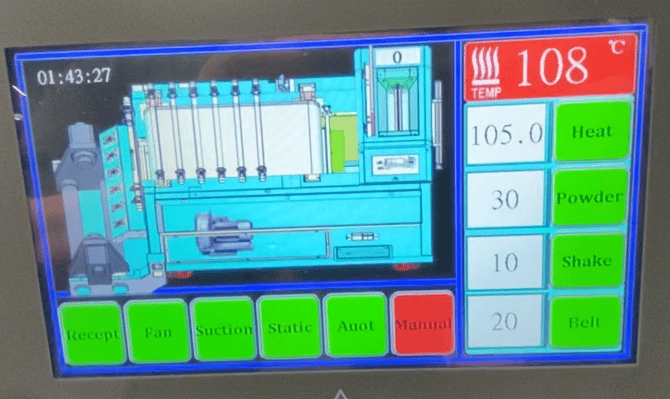
Temperature Control
The large red display shows the current oven temperature.
Example shown on the screen:
108°C
This is the temperature inside the main curing chamber.
Below this value is the set temperature.
Example:
105°C
The oven will heat until it reaches the set temperature and then maintain that level.
Heat Button
The Heat button activates or deactivates the oven heating system.
Always allow the oven to reach the correct temperature before starting production.
Powder Application Control
Powder
Controls the amount of adhesive powder applied to the printed film.
Higher values increase powder coverage.
Incorrect powder settings may cause:
Too much powder
-
rough transfer surface
-
excessive powder residue
Too little powder
-
weak adhesion
-
incomplete transfer bonding
Shaker Control
Shake
Controls the vibration intensity used to remove excess powder.
Proper shaking ensures that powder remains only on printed areas.
If shake intensity is too low, excess powder may remain on blank areas of the film.
Conveyor Belt Speed
Belt
Controls the speed of the conveyor belt moving film through the oven.
This setting affects curing time.
Slower belt speeds allow longer curing time.
Faster belt speeds increase production speed but reduce curing time.
System Function Controls
The bottom row of buttons controls different components of the oven system.
Recept
Controls the film receiving system that guides film into the oven.
Fan
Controls the air circulation fan inside the oven.
Proper airflow helps maintain even temperature distribution during curing.
Suction
Controls the powder recovery suction system.
This removes excess powder and helps keep the machine clean.
Static
Controls the static removal system.
DTF film can build static electricity which may cause powder distribution problems.
This system helps reduce static buildup during printing.
Auto
Runs the shaker and oven automatically using the current settings.
This is the normal mode used during production.
Manual
Allows individual components of the oven to be controlled manually.
Manual mode is typically used for:
-
troubleshooting
-
machine cleaning
-
system testing
Best Practices for Nebula Oven Operation
When operating the Nebula DTF oven:
-
allow the oven to reach full temperature before printing
-
monitor temperature stability during production
-
verify powder coverage before running large jobs
-
avoid changing multiple settings at the same time
Improper oven settings can result in:
-
under-cured transfers
-
poor adhesion to garments
-
excessive powder residue
Next Steps
Continue the Hyper DTF training series:
Hyper DTF – Pre-Print Checklist
Hyper DTF – Climate Control for DTF Printing
Hyper DTF – Ink Storage and Handling
Hyper DTF – DTF Film Handling
Hyper DTF – Shutdown Procedure