
Understanding these settings allows operators to properly control:
-
powder application
-
conveyor movement
-
suction and powder recovery
-
curing temperatures
-
film take-up system
Correct settings ensure proper adhesive powder distribution and consistent curing of DTF transfers.
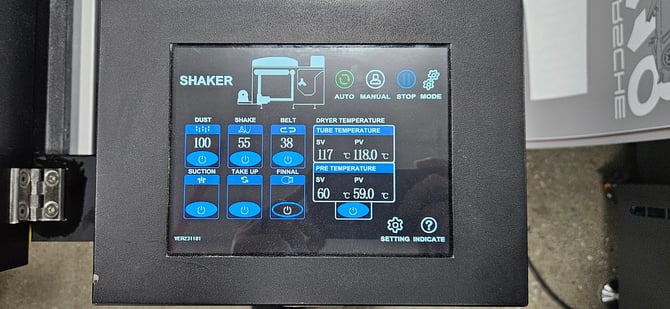
Main Operation Modes
At the top of the control panel are the system operation modes.
These determine how the shaker and dryer operate.
Auto
Runs the shaker and dryer automatically using the configured settings.
This is the normal mode used during production.
Manual
Allows individual components of the shaker to be turned on or off manually.
This mode is typically used for:
-
maintenance
-
troubleshooting
-
testing machine functions
Stop
Immediately stops the shaker and conveyor system.
Use this when stopping the machine during operation.
Mode / Settings
Accesses additional configuration settings for the shaker system.
These are typically adjusted during machine setup or technician servicing.
Powder Application Controls
These controls manage how powder is applied and removed from the printed film.
Dust
Controls the amount of adhesive powder being applied to the film.
Higher values increase powder coverage.
Too much powder may cause:
-
rough transfers
-
excessive powder buildup
Too little powder may cause:
-
weak adhesion
-
incomplete bonding
Shake
Controls the vibration intensity used to remove excess powder.
This ensures only the correct amount of powder remains on the printed areas.
Proper shake settings help prevent:
-
excess powder on blank areas
-
uneven powder distribution
Conveyor Belt Control
Belt
Controls the speed of the conveyor belt that moves film through the dryer.
This directly affects curing time.
-
Faster belt speed → shorter curing time
-
Slower belt speed → longer curing time
Adjust belt speed carefully to maintain proper curing.
Suction
The suction system holds the DTF film securely against the conveyor belt to prevent the film from shifting or slipping while moving through the oven.
This is especially important before the film exits the oven and becomes attached to the take-up roll, as the film is not yet under tension from the take-up system.
Film Take-Up System
The Take Up button turns the take-up rollers on and off.
Once the film is attached to the take-up roll, the rollers help create the tension needed to pull the film smoothly through the system.
When the oven is in Auto Mode, the take-up rollers will automatically start and stop as the film sensor is triggered.
Final Button
The Final button bypasses the film sensor at the front of the oven, allowing the conveyor belt and take-up system to continue pulling the film through the oven and onto the take-up roll.
This function is typically used after cutting the film at the end of a print job so the remaining film can fully pass through the oven.
Oven Temperature Controls
The oven contains two heating zones.
Tube Temperature (Main Curing Zone)
This is the primary curing temperature inside the oven.
Example shown on the display:
SV: 117°C
PV: 118°C
Where:
SV = Set Value (target temperature)
PV = Process Value (actual temperature)
The PV temperature should remain close to the SV value during operation.
Pre Temperature (Pre-Heating Zone)
The pre-heat zone gradually warms the film before it reaches the powder and shaker area.
Example shown:
SV: 60°C
PV: 59°C
This helps stabilize the film and powder before full curing.
Best Practices for Oven Operation
When operating the Hyper DTF oven:
-
allow the oven to reach full temperature before printing
-
monitor PV temperatures to ensure stable heating
-
avoid adjusting multiple settings at once
-
verify powder coverage before starting production
Incorrect oven settings may lead to:
-
under-cured transfers
-
excessive powder residue
-
weak adhesion to garments
Next Steps
Continue the Hyper DTF training series:
Hyper DTF – Pre-Print Checklist
Hyper DTF – Climate Control for DTF Printing
Hyper DTF – Ink Storage and Handling
Hyper DTF – DTF Film Handling
Hyper DTF – Shutdown Procedure