
The control panel allows operators to adjust:
-
powder dispensing speed
-
shaker vibration strength
-
front guide heating
-
curing temperature
-
shaker and powder systems
Understanding these controls helps ensure proper powder distribution and consistent curing of DTF transfers.
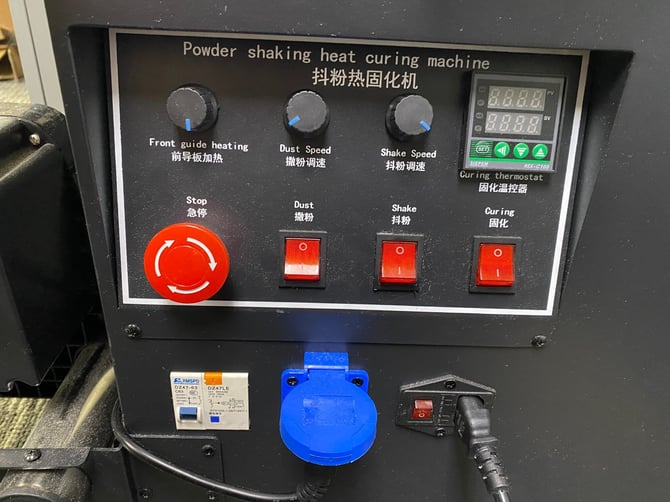
Control Panel Overview
The Eyas2 mini shaker uses manual dial controls and simple switches instead of a touchscreen interface.
This design keeps the machine simple and easy to operate.
Front Guide Heating
The Front Guide Heating dial controls the heating plate located at the film entry area.
This helps stabilize the film before it enters the shaker and oven.
Typical use:
-
Leave at a moderate setting
-
Prevents ink from cooling too quickly before powder application
Dust Speed
The Dust Speed dial controls how much adhesive powder is applied to the printed film.
Increasing dust speed results in:
-
heavier powder coverage
Reducing dust speed results in:
-
lighter powder coverage
Too much powder can cause:
-
rough transfer texture
-
powder buildup in the shaker
Too little powder can cause:
-
poor adhesion during pressing
Shake Speed
The Shake Speed dial controls the vibration strength used to remove excess powder from the film.
Proper shake settings ensure:
-
powder stays only on printed areas
-
excess powder falls back into the collection drawer
If shake speed is too low, excess powder may remain on blank film areas.
Curing Temperature Controller
The digital thermostat controls the main oven curing temperature.
This display shows:
-
SV (Set Value) – target temperature
-
PV (Process Value) – current oven temperature
For most applications, the oven is typically set around:
110 °C
Allow the oven to fully reach temperature before starting production.
Control Switches
The panel contains several switches used to activate different parts of the machine.
Dust
Turns the powder dispensing system on or off.
Shake
Activates the shaker mechanism that removes excess powder.
Curing
Turns the oven heating system on or off.
Emergency Stop
The large red knob is the emergency stop control.
Pressing or turning this knob will immediately stop the shaker system.
Use this if:
-
film jams inside the oven
-
the shaker needs to be stopped quickly
-
maintenance is required
Film Loading
When loading film into the mini shaker:
-
Pull the film through the shaker and dryer.
-
Attach the film to the take-up roll.
This allows the film to move through the system automatically during printing .
Take-Up Roll Sensor
The take-up roll uses a sensor inside the shaker area.
This sensor automatically starts and stops the take-up motor as film exits the oven .
If the sensor does not trigger properly, sensitivity may need to be adjusted on the sensor module.
Maintenance
After each printing session:
-
brush loose powder from the shaker area
-
clean powder buildup from the sensor
-
empty the powder drawer back into the powder bin
-
wipe excess powder from the machine
When cleaning the oven interior, do not touch the hot heating bulbs .
Related Articles
How to load your artwork to MainTop for the Eyas2 DTF printer
Why does my Eyas2 printer display "Comm. ERROR - Link Fail" on startup and how do I fix it?